
This post is the first in a series about well-known programming algorithms. To see more posts on this topic, check out the Algorithms tag. The source code for this post and every algorithm post can be found at my Algorithms GitHub repo here.
Introduction
I thought it would be proper to begin a series of posts on algorithms by discussing the bubble sort algorithm since it is widely considered to be one of the most simple algorithms (sorting or otherwise) you will encounter when you are studying the topic. Bubble sort is not the most efficient sorting algorithm that exists and many popular modern languages use more efficient algorithms. For example, Java uses dual-pivot Quicksort for primitive values, and Python uses TimSort, which is a combination of both merge sort and insertion sort. If you’re really curious and you want to check out the C# (.NET) “Introspective Sort” implementation, you can read the open source code here (search for “IntrospectiveSort”).
In fact, I would describe the overall purpose of learning bubble sort as more of an academic programming exercise and a mental warm-up before tackling more advanced or complex sorting algorithms. With that in mind, let’s dive right in.
Purpose
To begin, I think it’s important that we clearly understand the objective of what we are trying to accomplish with this code. Hopefully most (or all) of you have figured out already that we need to sort some values. If we go a step further we might wonder what kind of values or asked differently, what kind of data structures does bubble sort … sort? The generic answer to that question is that bubble sort works on arrays and linked lists, or any data structure where adjacent elements can be compared and swapped (if they are out of order) going from left to right.
For example, an array of values like this
[6, 2, 1, 4, 5, 3]
becomes this
[1, 2, 3, 4, 5, 6]
after sorted using the bubble sort algorithm. If you’re a visual learner, here’s a simple animation of what changes the array is undergoing while bubble sort manipulates it.
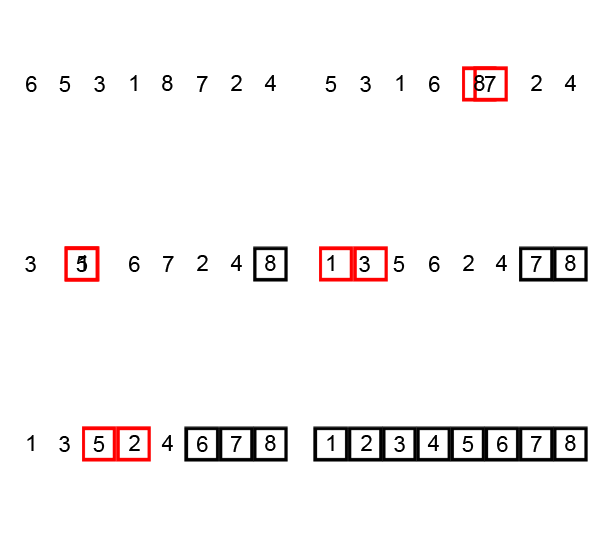
The Code (JavaScript)
Now that we’re clear about what we expect the bubble sort algorithm to do, let’s write a function and some unit tests in JavaScript to implement it. We can start with just the method signature part of the function, which just accepts an input array. I’m choosing to write this with an arrow function, but it can be written either way here, you can choose whichever you like:
1
2
3
4
5
6
7
8
9
const bubbleSort = (inputArray) => {

};

// or

function bubbleSort(inputArray) {

}
Keep in mind that the bubble sort function is going to modify the input array in place, not return a new array. So now, being the good test-driven developers that we are (right?) let’s write a quick handful of unit tests that we can run to ensure our function is working as intended.
Unit Tests
Let’s keep the tests fairly simple for the purposes of this exercise. The five tests that cover our main concerns are
- Distinct values
- Some repeated values
- Negative values
- A mix of positive and negative values
- some alphabetical characters
While there are some testing frameworks available for JavaScript code like Jasmine, Mocha, and others - I’d like to keep this simple and so those are outside the scope of this post. But knowing how those frameworks work is important if you’re going to have a decent size JavaScript codebase. Here is the code for the unit tests, which will simply log the output of each test to the console:
1
2
3
4
5
6
7
8
9
10
11
12
13
14
15
16
17
18
19
20
21
22
23
24
25
26
// Unit Tests

// all distinct values
const distinctValuesArray = [6, 3, 1, 5, 4, 2];
bubbleSort(distinctValuesArray);
console.log(distinctValuesArray); // expected [1, 2, 3, 4, 5, 6]

// some of the same values
const sameValuesArray = [3, 3, 1, 2, 4, 2];
bubbleSort(sameValuesArray)
console.log(sameValuesArray); // expected [1, 2, 2, 3, 3, 4]

// values with negative numbers
const negativeValuesArray = [-1, -2, -3, -5, -6, -9];
bubbleSort(negativeValuesArray)
console.log(negativeValuesArray); // expected [-9, -6, -5, -3, -2, -1]

// values with both positive and negative numbers
const mixedValuesArray = [-1, -3, -5, -4, 8, 4, 2, 7, 1];
bubbleSort(mixedValuesArray)
console.log(mixedValuesArray); // expected [-5, -4, -3, -1, 1, 2, 4, 7, 8]

// values with alpha characters
const charValuesArray = ['f', 'a', 'c', 'g', 'b', 'd', 'e'];
bubbleSort(charValuesArray)
console.log(charValuesArray); // expected ['a', 'b', 'c', 'd', 'e', 'f', 'g']
Back to the code
Now that we have our tests ready, let’s get back to writing the bubble sort function itself. We are going to need to reference the length of the input array more than once, so let’s start by capturing that value into a constant for later use. Then, we need to create a for loop that has the iterator (i) starting at the position of the first element in the array, and goes until it reaches the last element. This first for loop will actually be the outer loop as you will see shortly. So far our function looks like this:
1
2
3
4
5
6
7
8
const bubbleSort = (inputArray) => {

  const elementCount = inputArray.length;

  for(let i = 0; i < elementCount; i++) {

  }
};
Next, we need to create another for loop inside the first one, in which the comparison of values will happen. However, the loop condition for this inner loop will be different, since we only need to inspect values that we haven’t already swapped, and since the current element plus the next element are always compared, that means we compare two elements at a time. So the last element will be inspected when we reach the second to last element. So we can subtract 1 from the inner loop condition also. Here’s what the code looks like when adding the inner loop:
1
2
3
4
5
6
7
8
9
const bubbleSort = (inputArray) => {

  const elementCount = inputArray.length;

  for(let i = 0; i < elementCount; i++) {
    for(let j = 0; j < elementCount - 1 - i; j++) {

  }
};
We’re now most of the way done with our function, believe it or not. The last part is just the body of the inner for loop, which compares the current element with the next one, and swaps them if they are out of order. Here’s what that looks like, which completes our function:
1
2
3
4
5
6
7
8
9
10
11
12
13
const bubbleSort = (inputArray) => {

  const elementCount = inputArray.length;

  for(let i = 0; i < elementCount; i++) {
    for(let j = 0; j < elementCount - 1 - i; j++) {
      if(inputArray[j] > inputArray[j + 1]) {
        const valueHolder = inputArray[j];
        inputArray[j] = inputArray[j + 1];
        inputArray[j + 1] = valueHolder;
      }
  }
};
Now that our function is complete, we should be able to run it with the unit tests and observe the output we get from the console logging. On my machine, I ran the command node bubblesort.js from the VSCode terminal, but your terminal command might be different. The output from the unit tests shown above should result in something that looks like this:
1
2
3
4
5
6
7
8
9
10
11
12
[ 1, 2, 3, 4, 5, 6 ]
[ 1, 2, 2, 3, 3, 4 ]
[ -9, -6, -5, -3, -2, -1 ]
[
  -5, -4, -3, -1, 1,
   2,  4,  7,  8
]
[
  'a', 'b', 'c',
  'd', 'e', 'f',
  'g'
]
That’s it!
Wrapping Up
As I mentioned, bubble sort is a very simple algorithm. In other posts, I will explore other algorithms that gradually get more complex. So stay tuned, and have a look around the site to see what else I’ve written about.
If you have any questions please feel free to contact me at the social media links found in the footer on this site.